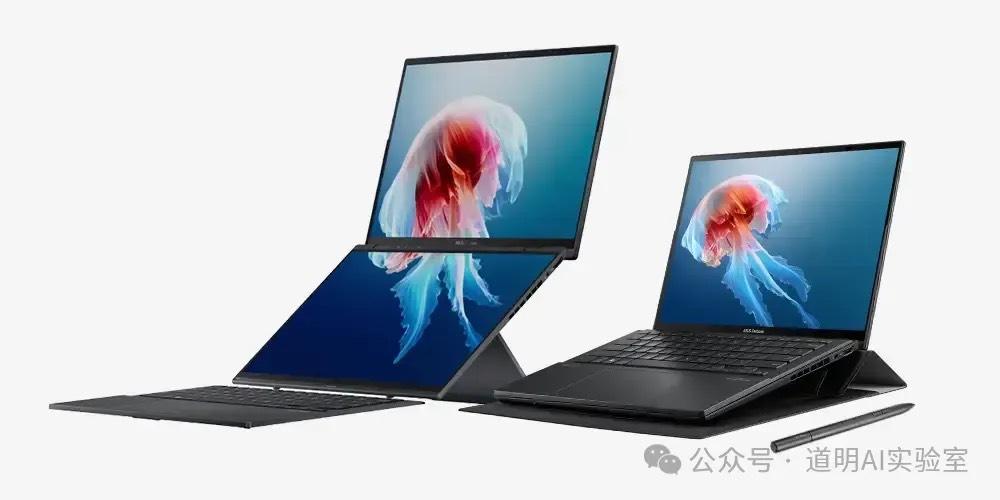
There is only one reason that would make me switch from an iPhone to a Samsung: the foldable screen.
And there is only one reason that would make me consider a Windows laptop as a daily option again after more than a decade: the dual screen.
The latest ASUS Zenbook Duo features: two 14-inch 120Hz high-refresh-rate 3K touch screens; 1.65kg; long battery life; and it uses Intel's latest Core Ultra 9, marketed as an AI PC.
Over the past week, I tried migrating all my work to this new platform. The advantages are obvious:
- Lightweight: This has always been a strength of the MacBook, but it's truly the first time a Windows laptop with a top-tier, high-spec CPU has achieved this.
- Dual-screen is cool: Reading documents on one screen while editing or writing code on the other—the foundation of productivity is larger information throughput. Everyone knows dual screens are efficient.
- Battery life: While it can't compare to a MacBook, based on my usage habits, it lasts about six to seven hours, which can handle a day out.
- Sorry, I can't find a fourth.
Similarly, the disadvantages are also obvious:
- Fan noise is significantly reduced but still clearly audible. The cooling vents no longer get burning hot like traditional Windows laptops, but they still feel overheated. Compared to the long-lasting cold feel of a MacBook, the gap is still massive.
- Although we're in the Windows 11 era and the OS friendliness has greatly improved, the gap compared to macOS remains large. After a series of moves by Microsoft, there's a general expectation that WSL (Windows Subsystem for Linux) will gradually fade away. If that happens, one more reason for me to use Windows will disappear.
- Windows is like a trash can: Microsoft installs some apps; the manufacturer ASUS installs some apps; then the chipmaker Intel installs even more. This approach, which completely contradicts AI development trends, is being packaged as an "AI PC," which is quite ironic.
- 32GB of RAM sounds like a lot, but it's actually quite small.
Let's focus on the AI PC functionality.
An ideal AI PC should provide various AI features—such as AI search, Q&A, voice assistants, knowledge management, document generation, email management, and image processing—without requiring the user to perform complex installations and configurations.
However, the reality is that currently, so-called AI PCs are just laptops with chips better suited for models, combined with other I/O devices and a chassis. Simply changing the "core" doesn't make it a new species.
Of course, as someone obsessed with running large models locally, I fully accept the term "AI PC." I just don't accept that discussions about AI PCs only mention Windows and Intel while forgetting Apple, which has been generations ahead.
As mentioned earlier, the dual-screen and lightweight design were my only reasons for trying a Windows laptop. However, since the Intel Core Ultra 9 chip is claimed to be born for AI, it would be a waste not to run a model locally.
Coinciding with the release of LLaMa-3, I tried local deployment. For a better comparison, I also tested it on a MacBook with an Apple M2 Max.
First, the Intel chip under Windows:
I strictly followed the guide issued by Intel: https://intel.github.io/intel-extension-for-pytorch/llm/llama3/xpu/
To summarize the installation process:
- Install Visual Studio 2022
- Install Intel oneAPI
- Update Intel chip drivers
- Configure a Python virtual environment
- Install two Intel extensions
- Run a test
The entire process took nearly a whole day, and the result was still a failure to run LLaMa-3-8B-Instruct. Aside from errors in the codebase itself during installation, the final failure likely stemmed from tokenizer incompatibility.
I naturally have the patience to investigate whether I made mistakes during the process or if there are genuine compatibility issues that need time to resolve.
In contrast, running models on a MacBook is exceptionally simple. Apple released support for the MLX library last year, so the entire process was:
- Configure a Python virtual environment;
- Install two libraries: mlx and mlx-lm;
- Run the code:
from mlx_lm import load, generate
model, tokenizer = load("mlx-community/Meta-Llama-3-70B-Instruct-4bit")
response = generate(model, tokenizer, prompt="Introduce yourself", verbose=True)
Including the time to download the model files, it took less than 30 minutes. Note that this is the 70B int4 quantized version, with a file size of about 40GB as shown below.
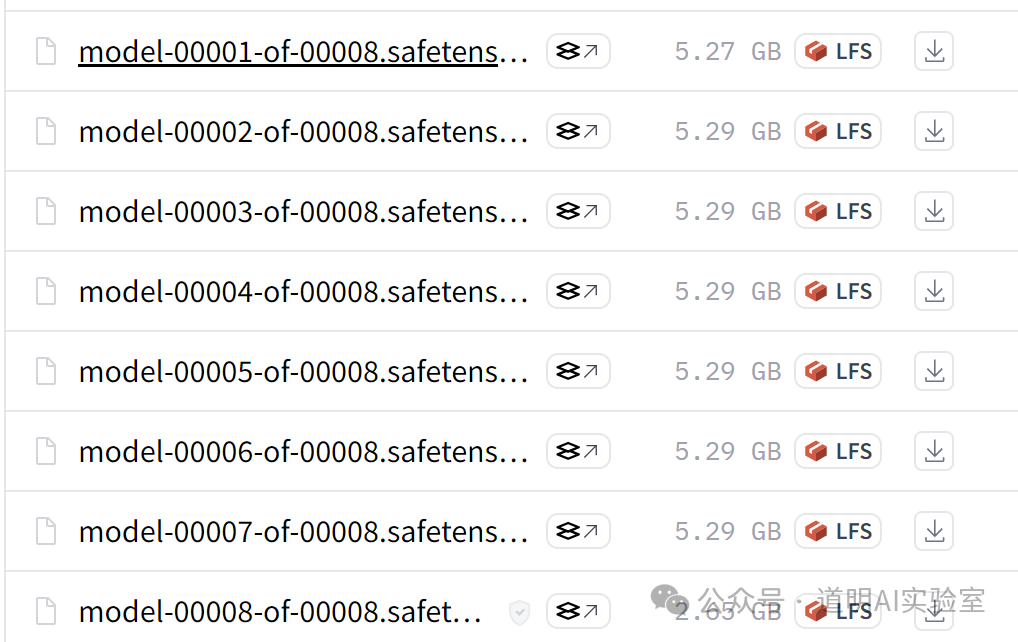
Once running, the memory usage was 37GB. This is why I said 32GB of RAM is too small.

The actual results are as follows:

This was just a test run, and there is plenty of room for optimization.
Actually, this result was expected. I believe this Windows laptop will soon be able to run 8B parameter models smoothly. However, the reality of the gap still shocked me. I knew the shortcomings of Windows+Intel and the strengths of MacBooks, but this all-encompassing gap makes me more certain that "Wintel" (Windows + Intel) cannot do AI PCs well. This isn't just a problem with Microsoft or Intel; if you swapped them for AMD or Qualcomm, the result might be the same. And it's certainly not ASUS's fault.
This is their collective problem!
- Apple never mentioned the "AI PC" concept before; in fact, almost every report discussing "AI PC" I've seen intentionally or unintentionally ignores Apple. But as I've said in public and private: since the release of the M1, this hardware has been built for the future—or more directly, for the AI era. Everyone in the developer community understands this; only those who learn via "short videos" might be unaware of the current state of the community.
- In today's era, especially with the rise of AI, the most important logic for product restructuring is system-level adaptation. Beyond the model, everything from the underlying hardware to the OS, including form factor and interaction, must be more tightly coupled in an "all-in-one" approach. Even NVIDIA and Google's solutions for model training and inference tell the market that models, hardware, and OS may all be tightly coupled.
- The comparison of running models on two systems highlights product differences. Apple owns its chips, OS, and final product. It has the space and advantage to optimize for future scenarios. Windows, however, is a "trash can" as I described: Intel handles hardware, Microsoft handles the system, Intel also handles drivers, and manufacturers still want to add their own apps.
- Another difference that people might overlook: when Meta released Llama 3, they didn't provide a version specifically for Apple's M-series chips, yet the powerful developer community released an int4 quantized version almost immediately. Meanwhile, in the Intel installation guide I followed, it suggested that unless users have massive computing resources to do their own quantization, they should wait for the int4 version on Hugging Face. Two days later, where is that version? The community contrast is clear.
- More companies are realizing the value of "All-in-One," which is why Google is merging Android, Chrome, and hardware. In an era where high-quality models are plentiful, once Apple fully enters the field, the Google+Samsung+Qualcomm combination might be unable to compete; Google will have to rely on itself. Huawei, of course, has already gone fully independent.
I still remember that a year ago, when discussing "AI PC," my clear stance was: if the chip, OS, and product belong to three different companies, it will be very difficult to create the truly ideal form for the AI era.
Wintel cannot do AI PCs well.
Returning to the intro, the only reason I don't use an iPhone is the foldable screen, and the only reason I consider a Windows laptop for daily work is the dual screen.
But what if everyone had foldable and dual screens?